¶ Discovery app
Windows portable app, 12.9 MiB. Extract the entire ZIP before opening the app.
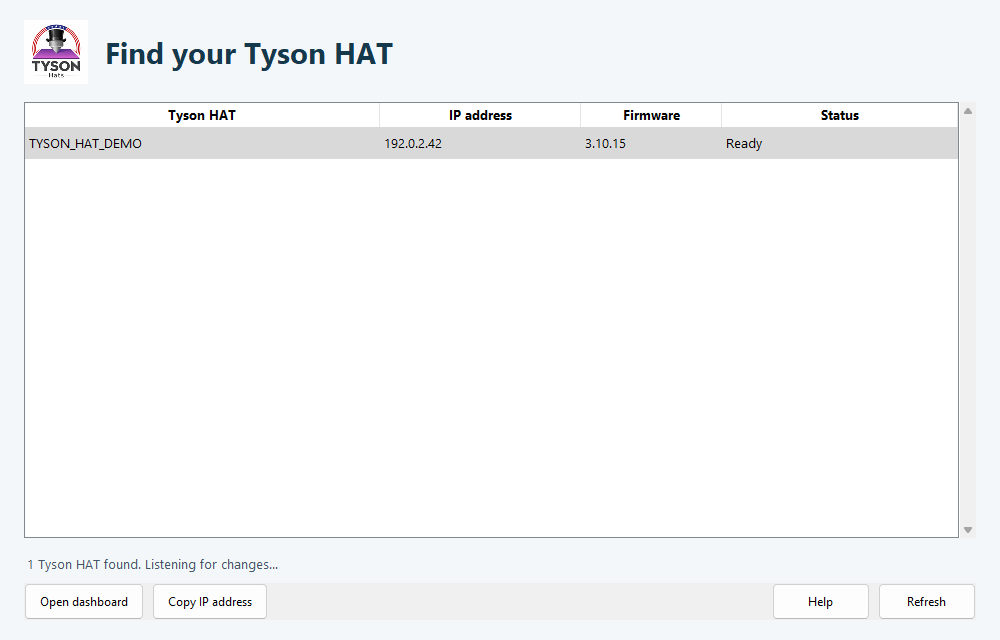
Tyson HAT Discovery 1.0.3 is a separate Windows app for finding HATs on your local network. It displays their address, reads the firmware version when accessible, and opens the dashboard. It only discovers devices and reads identification; it does not change printer, heater, or HAT settings.
¶ Start the app
- Download Tyson HAT Discovery using the button above.
- Extract the entire ZIP to a folder on your Windows computer.
- Keep the _internal folder beside Tyson HAT Discovery.exe. Do not move the executable out on its own.
- Connect the computer to the same local network as the HAT and open the executable.
- If Windows asks for network access, permit the app on your trusted private network.
The app starts searching immediately. You do not need to install Python, the Firmware Installer, or new HAT firmware to use it. Administrator access, a printer access code, and a cloud account are not required for discovery. A protected HAT asks for its dashboard user ID and password when you open the dashboard. Discovery itself does not collect credentials.
¶ Read the list
| Column | Meaning |
|---|---|
| Tyson HAT | The controller's advertised name or identity |
| IP address | The address found for that HAT |
| Firmware | The version read from its dashboard when reachable |
| Status | Whether dashboard identification could be read |
Select a row and choose Open dashboard, or double-click the row. Copy IP address copies the selected address for use in another browser or tool. Refresh restarts discovery, which is useful after changing Wi-Fi or network adapters. Help opens the in-app network checklist.
Login required, Access code required or Authentication required means the HAT was found but its identification endpoint requires authentication. Login setup required means dashboard credentials still need to be configured. Discovery does not ask for or save those credentials. Select Open dashboard, then complete setup or sign in through your browser.
If discovery is unavailable but you know the HAT's IP, open that IP directly in a browser. You can also use the router's device list or the HAT's .local address where supported.
¶ If no HAT appears
- Confirm that the HAT is powered and has joined Wi-Fi. A new HAT may still need Software Setup.
- Confirm the computer is on the same local network. A similarly named guest network may isolate devices.
- Select Refresh after changing networks.
- Check Windows Firewall's private-network permission for this app.
- Check whether a VPN or router isolation policy is blocking local discovery. Adjust only the relevant local-network permission.
- Try a known IP directly to distinguish a discovery problem from a dashboard connection problem.
See Troubleshooting for missing temperatures after the dashboard opens.