¶ Firmware Installer
Windows installer, 18.5 MiB. For firmware 3.10.15, download the separate USB release ZIP and select Choose Release ZIP in the app before flashing.
Tyson Hat Firmware Installer 1.0.1 installs HAT firmware over a USB data cable on Windows 10 or 11, 64-bit.
¶ Install the Windows app
- Download Tyson Hat Firmware Installer using the button above.
- Run setup and follow its prompts. It installs for the current Windows user and adds a Start menu shortcut.
- Open Tyson Hat Firmware Installer from that shortcut.
Installing the Windows app does not flash the HAT. The package is currently unsigned, so Windows can display an unknown-publisher notice.
¶ Flash the bundled firmware
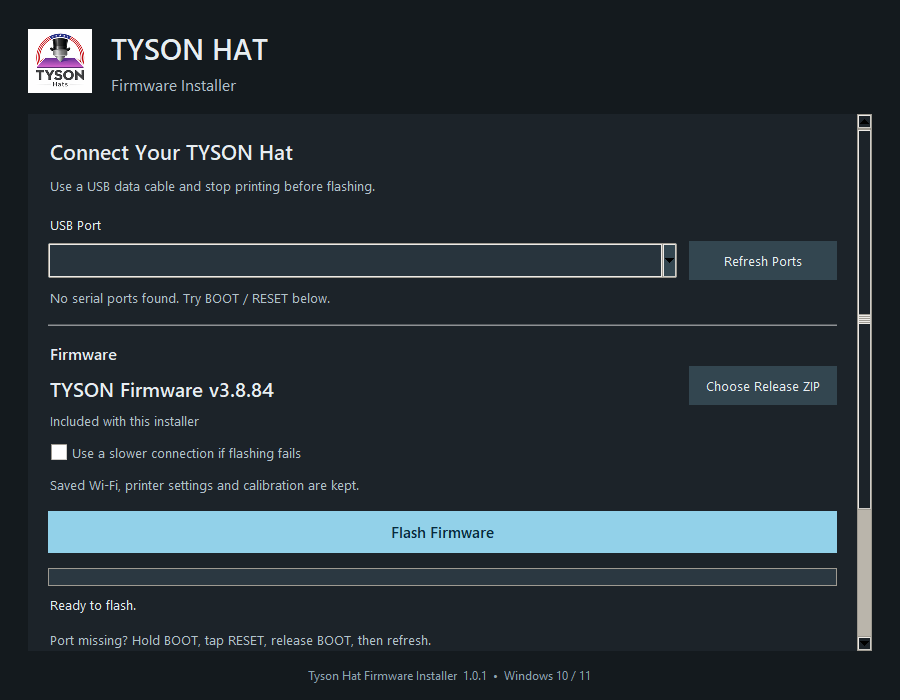
- Connect the HAT to the computer with a USB data cable.
- Choose its USB Port. Use Refresh Ports if you connected it after opening the app.
- Check the displayed firmware version. The included release is selected automatically.
- Choose Flash Firmware and review the version and port in the confirmation.
- Confirm and keep the USB cable connected until the app reports completion.
- Let the HAT restart, then open its dashboard and check Settings > About > Firmware Version.
Saved Wi-Fi, printer settings, and calibration are kept. The app does not need the printer's IP address or LAN access code, and the bundled firmware can be installed without an internet connection.
¶ If the port is missing
Check that the cable supports data and close other programs using the serial port. To enter the board's download mode:
- Hold BOOT.
- Tap RESET while continuing to hold BOOT.
- Release BOOT.
- Choose Refresh Ports in the installer.
- Select the new port if Windows assigned a different COM number.
Use Use a slower connection if flashing fails when connection or write failures persist. If flashing completed but the board remains in download mode, tap RESET.
This BOOT-and-RESET sequence selects download mode. Holding BOOT for several seconds after normal firmware has already started is a different action and can invoke Factory Reset; do not substitute it for this sequence.
¶ Choose another release
Choose Choose Release ZIP to select a complete compatible Tyson USB release. The package must contain its manifest, application, bootloader, partition table, and initial update data. The app supports compatible releases from v3.8.65 onward using this project's 4 MB dual-slot layout.
A lone .bin or .elf is not a USB release package. Use an application .bin only with the dashboard's Firmware Update feature when the HAT already supports it.
The installer checks the package, application identity and version, connected chip, and flash capacity before writing. It verifies written regions and reports a failed write as a failure. It does not automatically download newer releases.
¶ Save a log
Choose Save Log to export the flashing log when asking for help. The app also keeps logs under:
%LOCALAPPDATA%\Tyson Hat Firmware Installer\logs
¶ Uninstall
Remove Tyson Hat Firmware Installer through Windows Installed Apps. Uninstalling the Windows app does not change the HAT's firmware or saved settings.